Key Concepts in Bloowatch
What it is
Section titled “What it is”Bloowatch is built around a small set of connected concepts. Once you understand how they fit together, everything else — scheduling, selling, reporting — clicks into place.
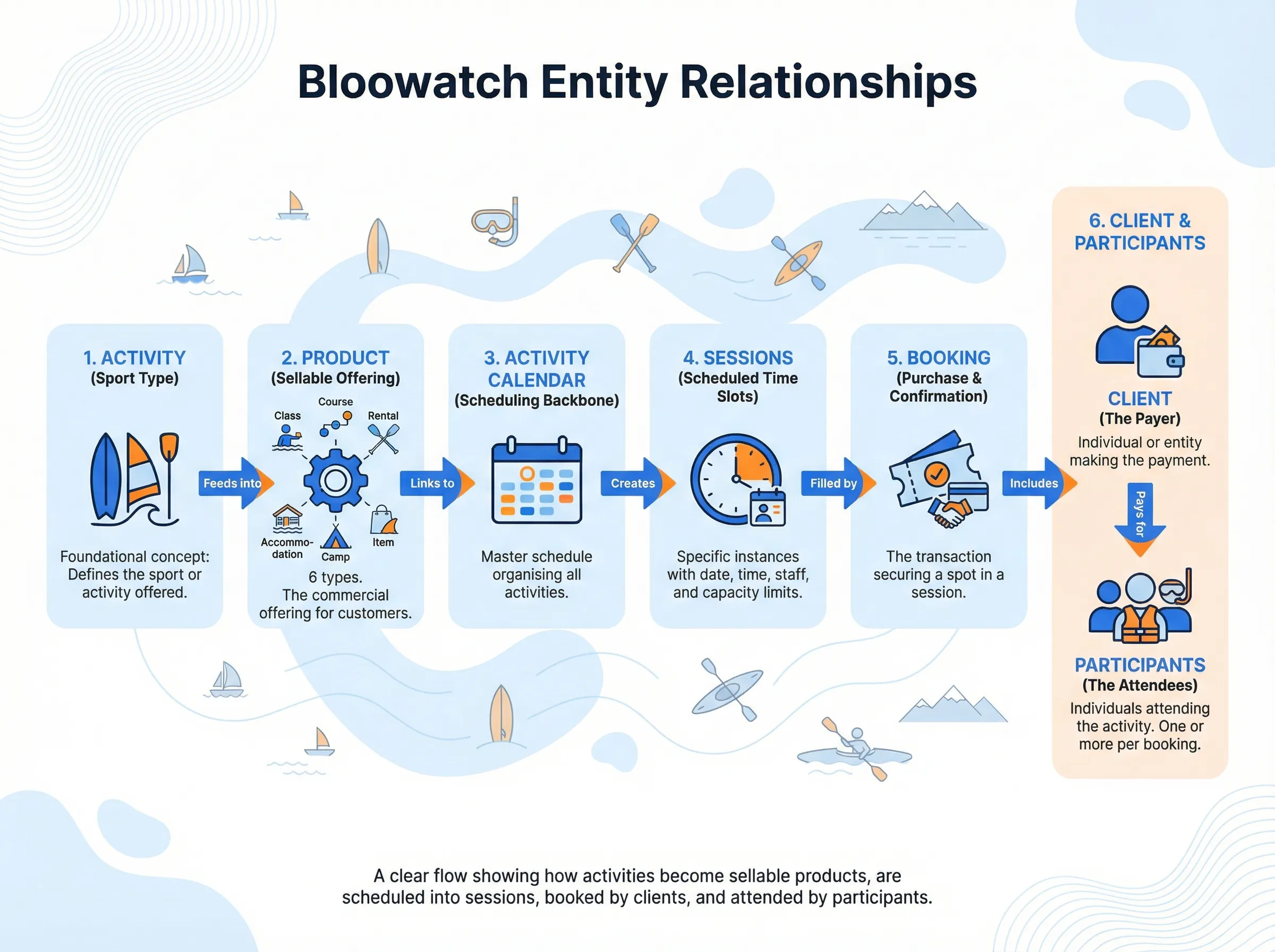
Here are the six building blocks you’ll work with every day:
Activity
Section titled “Activity”An Activity is the type of sport or experience your school offers. Think of it as a category for what you teach or sell.
Examples: Surfing, Scuba Diving, Ski Group Lesson, Kayak Tour.
You can be as broad or as specific as you need. A surf school might have one activity called “Surfing” or split it into “Surfing for Kids” and “Surfing for Adults” — it’s up to you.
Activities define the structure: how many participants per instructor, which staff members are qualified, and what gear is needed.
Product
Section titled “Product”A Product is a sellable offering built on top of an activity. It’s what appears in your price list, your online shop, and your bookings.
Bloowatch has six product types:
| Product type | What it’s for | Example |
|---|---|---|
| Class | Single or recurring group/private sessions with flexible scheduling | ”2-Hour Surf Lesson” |
| Course | Multi-session programs with a fixed number of sessions | ”5-Day Beginner Dive Course” |
| Rental | Gear hire with per-hour or per-day pricing | ”Wetsuit Rental” |
| Accommodation | Overnight stays with room types and seasonal pricing | ”Beachfront Bungalow” |
| Camp | Bundles that combine accommodation + course in a single package | ”Kids’ Summer Surf Camp” |
| Item | Stock-based products with fixed pricing, sold standalone or as add-ons | ”Souvenir T-Shirt” |
Each product has its own pricing, availability rules, and optional add-ons.
Activity Calendar
Section titled “Activity Calendar”The Activity Calendar is the link between a product and the agenda. When you assign a product to an activity calendar, Bloowatch knows how to structure its availability and display its sessions in the planning views.
Think of it as the scheduling backbone: it tells the system “this product follows this activity’s rules for time slots, staff, and capacity.”
Session
Section titled “Session”A Session is a specific time slot on your agenda for a particular activity. It’s where the rubber meets the road — the actual event that happens on a given day, at a given time, with specific staff and a participant limit.
Every session has:
- A date and time
- A duration
- One or more assigned staff members
- A maximum capacity (determined by the activity’s participants-per-instructor ratio)
Sessions appear on the Activity Agenda, where you can create them, drag and drop them to new time slots, and see at a glance who’s booked in.
Booking
Section titled “Booking”A Booking (also called an Order) is a purchase — someone buying one of your products. It ties a customer to a session (or rental period, or accommodation stay) and tracks payment.
You can create bookings in two ways:
- Point of Sale (POS) — for walk-ins, phone calls, or in-person sales
- Online booking — customers book and pay through your website widget
A booking always has a Client (the person who pays) and one or more Participants (the people who show up).
Client and Participant
Section titled “Client and Participant”These are two roles a customer can play:
| Role | What they do |
|---|---|
| Client | The person responsible for the booking. They pay, receive emails, and are the main contact. Sometimes called the “Host.” |
| Participant | The person who actually takes part in the activity. They show up in session manifests and the agenda. Sometimes called a “Guest.” |
One person can be both. A solo traveler booking a surf lesson is both the client and the participant. A parent booking for their kids is the client — the kids are the participants.
What it is NOT
Section titled “What it is NOT”| People think… | But actually… |
|---|---|
| ”An Activity is the same as a Product” | An Activity is the type of sport. A Product is what you sell — it has pricing, availability, and can be booked. One activity can have many products. |
| ”A Session is a Product” | A Session is a scheduled time slot. The Product defines what’s being offered; the Session is when and where it happens. |
| ”The Client is always the Participant” | Not necessarily. The Client pays. The Participant shows up. Often they’re the same person, but a parent booking for children, or a company booking for employees, separates the two roles. |
| ”Bookings only happen online” | Bookings can be created from the POS (back-office) or through online sales. Many schools do both. |
Why it matters
Section titled “Why it matters”When these concepts are clear, setting up Bloowatch becomes straightforward:
- Create an Activity → defines what you teach and the rules (capacity, staff, gear)
- Create a Product → defines what you sell and at what price
- Link the Product to an Activity Calendar → enables scheduling
- Create Sessions → fills your agenda with time slots
- Take Bookings → assigns customers to sessions and collects payment
Skip a step or mix up the concepts, and you’ll end up with products that can’t be scheduled or sessions with no pricing. The chain matters.
A day in the life: the surf school golden path
Section titled “A day in the life: the surf school golden path”Here’s how these concepts play out for a typical surf school:
Setup (done once)
- You create an Activity called “Surfing” — max 8 students per instructor
- You create a Product of type Class called “2-Hour Surf Lesson” — priced at €45/person
- You link the product to an Activity Calendar so it shows up in your agenda
Daily operations
- You create a Session for tomorrow at 10:00 AM, assign instructor Maria, duration 2 hours
- A family of four walks in. You open the POS and create a Booking:
- The father is the Client (he pays €180)
- All four family members are Participants
- The session shows 4/8 spots filled on your Activity Agenda
- Two more people book online through your website — the session now shows 6/8
Maria checks the agenda in the morning, sees her 10 AM session with 6 participants, grabs 6 surfboards, and heads to the beach.
Glossary
Section titled “Glossary”Quick reference for all the terms covered above, plus a few more you’ll encounter:
| Term | Definition |
|---|---|
| Activity | The type of sport or experience offered (e.g., Surfing, Diving). Defines capacity, staff, and gear rules. |
| Product | A sellable offering with pricing and availability. Six types: Class, Course, Rental, Accommodation, Camp, Item. |
| Activity Calendar | The scheduling link between a product and the agenda. Controls how sessions are structured and displayed. |
| Session | A scheduled time slot for an activity, with a date, time, duration, staff, and capacity. |
| Booking | A purchase that assigns a customer to a session, rental, or accommodation. Also called an Order. |
| Client | The person responsible for the booking — pays and receives communications. Also called Host. |
| Participant | The person who takes part in the activity. Appears in manifests and the agenda. Also called Guest. |
| POS | Point of Sale — the back-office interface for creating bookings manually. |
| Activity Agenda | The planning view where you see and manage all sessions for your activities. |
| Add-on | A secondary product attached to a main product (e.g., photos, extra gear, insurance). |
| Manifest | A list of participants for a specific session — used by instructors on the ground. |
| Partner | An external organization (hotel, reseller, agency) that brings customers and earns commission. |
How it connects to other parts of Bloowatch
Section titled “How it connects to other parts of Bloowatch”These six concepts are the foundation. Everything else in Bloowatch builds on them:
- Planning — The Activity Agenda, Rental Agenda, and Accommodation Agenda all display sessions created from products
- Sales — Bookings and the POS use products and sessions to process sales
- Customers — Every booking links to a client and participants in the customer database
- Partners — Partner bookings add a commission layer on top of regular bookings
- Reports — Revenue, occupancy, and activity reports all roll up from booking and session data
- eCommerce — Your online booking widget sells products and fills sessions automatically
- Communications — Transactional emails are triggered by bookings and sent to clients
